

We’re back with our July update at DeepSee.io, and this month is all about visibility and control. We’ve introduced a new self-serve billing and usage area in the portal, sharpened our app risk detection, refreshed the PDF export, and shipped a round of polish across the platform.
Here’s what’s new.
Manage Your Plan & Usage in the Portal
We’ve completely reworked how you view and manage your subscription inside DeepSee.io. The new Plans & Usage screen brings your plan, your usage, and your add-ons together in one place.
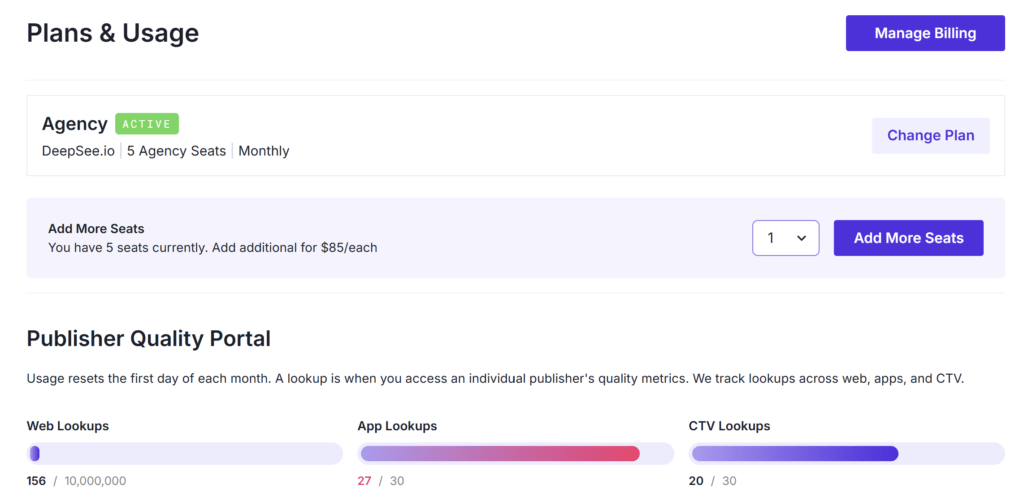
From the new screen you can now:
- See your current plan, seats, and billing cycle at a glance.
- Track lookups usage across web domains, mobile apps, and CTV apps.
- Monitor list exports and API credit usage.
- Change your plan, add seats, and enable add-ons directly.
A quick reminder on how usage works: a lookup is counted whenever you access an individual publisher’s quality metrics, and we track lookups separately across web, apps, and CTV. Usage resets on the first day of each month.
Need more room? You can add agency seats for $85 each, and increase your API credit allowance by upgrading to a higher tier, an additional 200K, 1M, 3M, or 10M credits per month depending on the tier you choose.
Changes to app & CTV lookups
Alongside these billing improvements, we’re retiring the temporary complimentary app and CTV lookups. Going forward, app and CTV lookups are managed like everything else in the portal, so you can see exactly what you’re using and add capacity whenever you need it, right from the billing screen.
If you rely on app or CTV data, you can add or increase these allowances at any time under Billing. Not sure what’s right for your workflow? Reach out and we’ll help you find the best fit.
Want a walkthrough? We’ve published several new knowledge base guides available here.
New Compliance Tests for AI Text & AI Imagery
AI-generated content is one of the clearest signals of low-effort, templated inventory, so this month we’ve added a new set of compliance tests that measure how much of a site’s text and imagery is AI-generated, and flag it accordingly.
AI-generated text
- Elevated Levels of AI-Generated Text (Risk): 20–50% of a site’s text pages rated AI-generated
- Majority AI-Generated Text Content (High Risk): 50%+ of a site’s text pages rated AI-generated
AI-generated imagery
- Low-Level Usage (Neutral): 5–10% of scanned images rated AI-generated
- Moderate Usage (Risk): 10–20% of scanned images rated AI-generated
- High Usage (Risk): 20–40% of scanned images rated AI-generated
- Near-Total Reliance on AI Imagery (High Risk): 40%+ of scanned images rated AI-generated
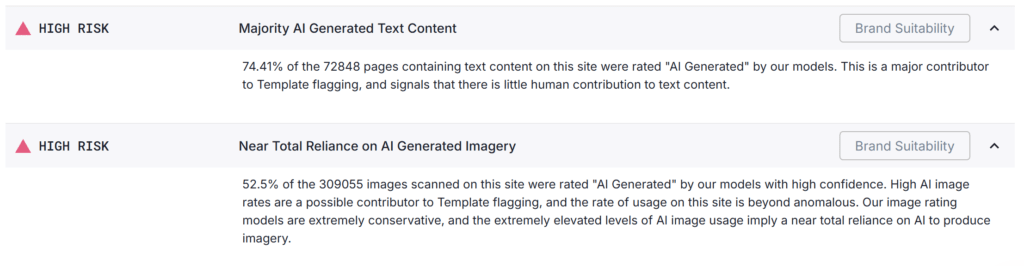
A high rate of AI-generated text points to little genuine human contribution and is a major contributor to our Template flag. On the imagery side, it’s worth noting that our image models are deliberately conservative, when we flag a site as heavily AI-generated, the real rate of usage is likely even higher.
Improved App Risk Signals
We’ve made meaningful upgrades to how we assess risk on the app side, with a focus on surfacing low-quality and potentially fraudulent apps. New and improved signals include:
- AI companion detection: better identification of AI companion apps
- Utility app detection: clearer flagging of utility-style apps
New Research: App & CTV Inventory
We’ve been digging into the app and CTV side of programmatic, publishing a series of pieces on what this inventory really looks like and how to evaluate it, with more research on the way.
You can find our latest articles on the DeepSee.io blog.
Bug Fixes & Polish
We also spent time on some spring cleaning this month, bug fixes across various areas of the portal, plus a range of small improvements to make the day-to-day experience smoother and more responsive.
As always, we’d love to hear what you think. If you’re curious about anything we’ve covered or want a closer walkthrough of what’s new, reach out to the team anytime at [email protected]



